The Hidden Cost of Storing Old IT Equipment
You probably know the room.
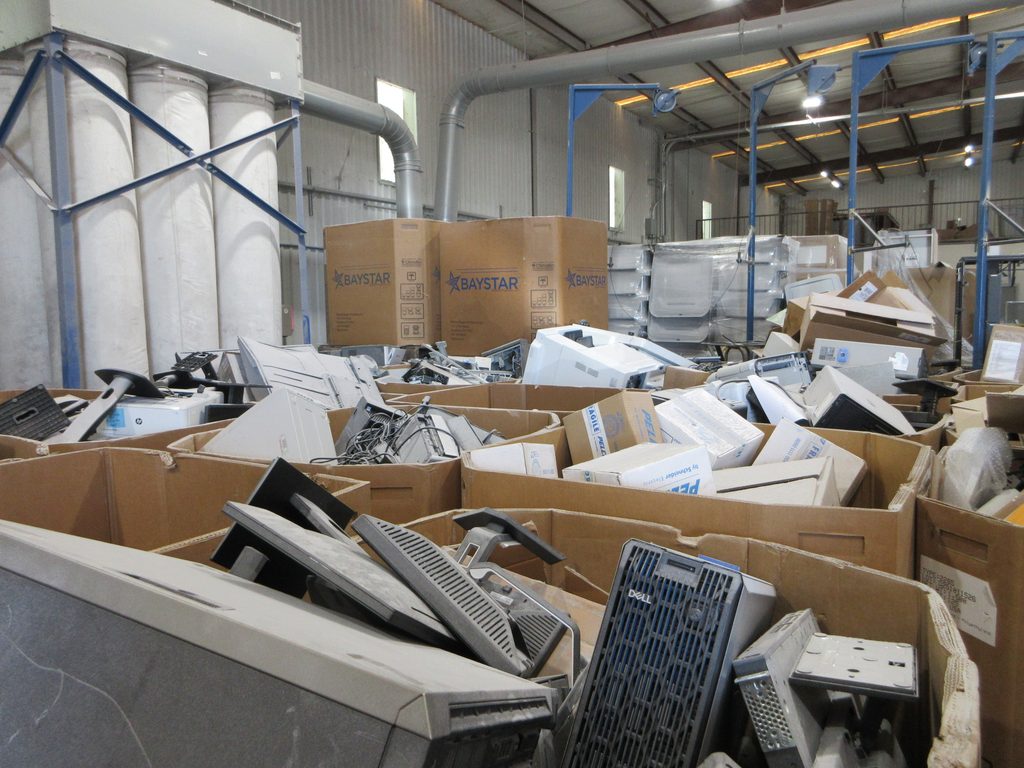
Old laptops stacked on a shelf. A few retired servers. Boxes of hard drives from the last technology refresh. Maybe some monitors and networking equipment nobody has touched in years.
No one wants to throw it away because it could contain company data. But no one has made a plan for it either.
So it sits.
Keeping old IT equipment may feel like the safest option, but indefinite storage comes with its own costs. Retired technology can create data-security risks, take up valuable space, lose resale value, and become harder to track over time.
Here are five reasons businesses should have a plan for retired IT assets.
1. Old Equipment Can Still Hold Sensitive Data
A computer doesn’t stop being a data-security concern just because you stop using it.
Retired laptops, desktops, servers, and hard drives may still contain:
- Customer information
- Employee records
- Financial data
- Emails and documents
- Saved credentials
- Proprietary business information
- PHI or other regulated data
Even a device that no longer powers on can contain a functioning storage drive.
That’s why electronics recycling should start with data security. Before equipment is recycled, resold, or otherwise leaves your control, determine what data it contains and how that data should be handled.
Depending on the asset, that could mean data sanitization or physical hard drive destruction.
Retired doesn’t mean data-free.
2. Technology Loses Value While It Sits
There’s another reason not to leave usable technology on a shelf for years: it isn’t becoming more valuable.
Computers and other IT assets can lose resale value as newer models enter the market. Batteries degrade. Hardware becomes outdated. Eventually, equipment that could have been reused or remarketed may have little value beyond recycling.
That’s where IT asset disposition (ITAD) comes in.
ITAD helps businesses evaluate retired technology and determine the appropriate next step. Equipment with remaining value may qualify for IT asset remarketing, while obsolete equipment can move into an electronics recycling stream.
| If the Asset Is… | Consider… |
| Functional with resale value | IT asset remarketing |
| Usable but no longer needed | ITAD/reuse |
| Obsolete or damaged | Electronics recycling |
| Holding sensitive data | Data sanitization or destruction first |
Waiting too long can turn a potentially valuable IT asset into something you’re simply paying to store.
3. Storage Space Isn’t Free
The IT closet might not have its own line on your balance sheet, but it still has a cost.
Old electronics consume:
- Office space
- Warehouse space
- Shelving and secure storage
- IT staff time
- Inventory-management time
Multiply that across several offices, and the problem gets bigger.
If your business has no realistic plan to reuse a piece of equipment, it’s worth asking:
Why are we still storing it?
Regular business electronics recycling or ITAD pickups can prevent years of obsolete technology from accumulating in the first place.
4. The Longer Equipment Sits, the Harder It Is to Track
Ask someone why a particular laptop has been sitting in storage for four years and you may hear, “I’m not sure.”
That’s part of the problem.
Over time, employees leave. Asset owners change. Labels disappear. Inventory systems get updated. Equipment moves between offices.
Eventually, your team may know what a device is, but not:
- Who used it
- What data it contains
- Why it was retained
- Whether the data was sanitized
- Whether it still has value
- Whether it can safely leave the organization
A structured ITAD program creates a clearer path from retirement to final disposition.
Asset inventories, serial-number tracking, data destruction documentation, and Certificates of Destruction can help businesses maintain accountability instead of creating a room full of question marks.
5. Eventually, Someone Still Has to Deal With It
Storing old IT equipment doesn’t eliminate the disposition decision. It just delays it.
Eventually, something forces the cleanout:
- An office relocation
- A technology refresh
- A merger or acquisition
- A facility closure
- A storage shortage
- An audit
- A major IT upgrade
Now, instead of dealing with 20 retired computers, your team may be staring at hundreds of mixed assets accumulated over several years.
A better approach is to make IT asset disposition part of the normal technology lifecycle:
Inventory → identify data-bearing assets → evaluate reuse/value → sanitize or destroy data → remarket or recycle → document
That process keeps retired equipment moving instead of letting it become tomorrow’s cleanup project.
So, What Should You Do With Old IT Equipment?
There isn’t one answer for every device.
| Equipment | Potential Next Step |
| Laptops and desktops with remaining value | Data sanitization + remarketing |
| Obsolete computers | Data security + electronics recycling |
| Hard drives requiring destruction | Physical hard drive destruction |
| Retired servers | Data destruction + ITAD |
| Networking equipment | Reuse, remarketing or recycling |
| Monitors and peripherals | Electronics recycling |
| Large mixed IT inventories | ITAD program |
And that’s an important distinction: ITAD and electronics recycling aren’t exactly the same thing.
Electronics recycling focuses on responsibly processing equipment that has reached the end of its useful life. IT asset disposition takes a broader view, considering data security, asset tracking, reuse, remarketing, recycling, and documentation.
The E-Waste Problem Isn’t Getting Smaller
Holding onto obsolete technology also postpones an environmental decision.
The Global E-waste Monitor 2024 reported that the world generated approximately 62 million metric tons of e-waste in 2022, but only 22.3% was formally collected and recycled in an environmentally sound manner.
For businesses, responsible IT asset disposition can address two issues at once: protect the information stored on equipment and find an appropriate next use or recycling path for the equipment itself.
Choose a Qualified Data Destruction Partner
When retired technology contains confidential information, the vendor handling it matters.
Secure Shredding and E-recycling is NAID AAA Certified for secure information destruction. NAID AAA Certification includes independent audits of required security practices, with ongoing scheduled and unannounced audits.
Depending on the project, Secure Shredding and E-recycling can also provide Certificates of Destruction and serialized hard drive reporting to help businesses document what happened to retired data-bearing assets.
Frequently Asked Questions About Old IT Equipment
How long should a business keep old computers?
There isn’t one universal timeframe. Once equipment no longer has an operational, legal, or business purpose, businesses should evaluate it for reuse, remarketing, electronics recycling, or secure destruction rather than storing it indefinitely.
Is data still accessible on a computer that no longer works?
Potentially. A computer may stop functioning while its hard drive or other storage media still contains recoverable data. Data security should be addressed before retired equipment leaves your control.
Should businesses destroy hard drives before recycling computers?
When physical destruction is the appropriate data-security method, the hard drive can be destroyed before the remaining equipment is recycled. Other assets may be candidates for secure data sanitization and reuse.
What is the difference between ITAD and electronics recycling?
Electronics recycling primarily addresses equipment at the end of its useful life. ITAD can include data security, inventory, asset tracking, reuse, remarketing, recycling, and documentation as part of a broader disposition process.
Can businesses recover value from old IT equipment?
Sometimes. Computers and other IT assets with remaining useful life or market value may qualify for remarketing. Evaluating assets sooner rather than leaving them in storage can improve the opportunity for value recovery.
Don’t Let Old IT Become a Permanent Fixture
If your IT closet is starting to look more like a technology museum, it may be time to make a plan.
Secure Shredding and E-recycling helps businesses securely manage retired computers, hard drives, servers, and other electronics through ITAD, hard drive destruction, electronics recycling, and IT asset remarketing.
Contact Secure Shredding and E-recycling to start clearing out retired IT equipment.
Call Us Today! 1-(833) 747-3399